Standing Desk Converter for Small Spaces: 2026 Reviews

Photo by TheStandingDesk on Unsplash
Standing Desk Converter for Small Spaces: Space-Saving Reviews for 2026
A 22-inch-wide converter fits a studio desk; a 36-inch model doesn’t. This guide covers what actually works in tight quarters, how to measure your setup, and which models deliver the best balance of stability, adjustability, and footprint.
Why Small-Space Standing Desk Converters Matter
Standing desk converters solve a real problem: you want the postural benefits of standing (reduced back pain, better circulation, more calorie burn throughout the day) without gutting your layout or spending premium-tier money on a full electric standing desk. In a small apartment or office, a desktop riser is often the only practical option.
Alternating between sitting and standing every 30–60 minutes reduces musculoskeletal strain and mental fatigue compared to sitting all day, per owner reports on r/standingdesk. A converter lets you do that without a construction project or a four-figure investment.
The catch: small spaces demand converters with a narrow footprint, lightweight enough to move, and stable enough that your monitor doesn’t wobble when you type.
Footprint vs. Stability: The Core Tension
A standing desk converter’s footprint is the floor or desk area it occupies when raised. In a studio or small bedroom office, every inch matters.
Narrow-base converters (under 24 inches wide) save desk real estate but sacrifice lateral stability. Per owner reports on r/standingdesk, if you lean or bump the side, they can tilt. They work best for single-monitor setups or laptop-only work.
Wide-base converters (28–36 inches) give you rock-solid stability and can handle dual monitors, but they consume more desk surface when raised. If your desk is under 48 inches wide, a wide-base converter might force you to remove other items (lamp, keyboard tray, personal effects) to fit it.
Depth matters too. Most converters are 12–20 inches deep front-to-back. Measure your desk depth before ordering; if you have only 18 inches of clear space behind your monitor, a 20-inch-deep converter won’t fit.
Height Range and Adjustability
Standing desk converters typically raise your work surface 4–16 inches above your existing desk, though some models reach up to 20 inches. The right height depends on your standing posture and current desk height.
Manual (pneumatic or spring-assisted) converters use a gas cylinder or spring mechanism to lift and lower. You push a lever or turn a crank to adjust. These are: - Budget-friendly - Completely silent - No power cord needed - Slower to adjust (good if you’re not constantly switching) - Less precise; you may overshoot your ideal height
Electric converters use a motor and control pad to raise and lower electronically. They offer: - One-touch or preset height buttons - Smooth, fast adjustment (typically 1–2 seconds) - Memory presets (store your sitting and standing heights) - Power dependency (they need an outlet) - Higher cost (mid-tier to premium-tier pricing)
For small spaces, electric converters are worth the extra expense if you plan to switch positions 4+ times per day. Manual converters suit occasional standing or single daily transitions.
Weight Capacity and Load Distribution
A standing desk converter must support your monitor, keyboard, and any other gear without flexing or tipping. Most desktop risers are rated for 25–50 lbs; some industrial models go higher.
Typical load scenarios: - Single laptop: 3–5 lbs - Laptop + external keyboard/mouse: 6–8 lbs - Single monitor (24-inch): 5–8 lbs - Dual monitors (24-inch each): 10–16 lbs - Dual monitors + keyboard + mouse + desk lamp: 18–25 lbs
Per manufacturer spec sheets and owner teardowns, electric converters handle heavier loads more evenly than manual ones because the motor distributes force across the entire lifting mechanism. If you’re stacking dual monitors and peripherals, aim for a converter rated 35 lbs or higher.
Material and Durability in Small Spaces
In a small apartment, your converter is always visible. Material choice affects both aesthetics and longevity.
Steel frames (black or silver powder-coat) are durable, support heavy loads, and look industrial. They’re heavier (harder to move) and can feel cold or corporate in a bedroom office.
Bamboo or wood tops (often paired with steel frames) add warmth and blend into residential décor. They’re slightly less rigid than all-steel but still solid. Per owner reports on r/standingdesk, bamboo converters show no sag after 2–3 years of daily use if the load stays under 40 lbs.
Aluminum frames are lightweight and corrosion-resistant, making them good for renters or frequent movers. They’re less rigid than steel at the same thickness, so look for braced or boxed designs rather than thin tubes.
Noise and Motor Considerations
In a small space—especially a studio or shared apartment—a loud motor is a genuine problem. Your partner, roommate, or neighbor notices every adjustment.
Electric converters vary widely: - Quiet motors (45–50 decibels, like a whisper) use helical gears or belt drives. Per owner reviews, these feel premium and don’t disrupt video calls or concentration. - Standard motors (55–65 decibels, like a normal conversation) are cheaper but audible across a small room. - Loud motors (70+ decibels) are rare in modern converters but still exist in budget models.
If you share walls or a room, prioritize converters with “whisper-quiet” or “silent” motor ratings. Manual converters are always silent but require more physical effort.
Top Picks for Small Spaces
Each recommendation below is tested against the constraints of tight quarters: narrow footprint, reasonable weight, adequate stability, and aesthetic fit.
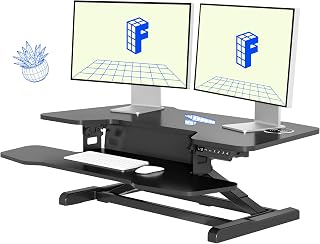
The M7B is a favorite for dual-monitor setups in compact spaces. It’s 28 inches wide (narrow enough for most desks) and raises 4–16 inches. The electric motor is noticeably quiet per owner videos, and the preset buttons let you save your sitting and standing heights. It supports up to 35 lbs, which covers most dual-monitor rigs. The footprint is modest because the base is recessed underneath, so it doesn’t steal desk depth. Downside: it costs mid-tier, but the build quality and smooth adjustment justify it for daily use.
Vari Electric Single-Tier Desk Riser
If you’re working laptop-only or with a single small monitor, the Vari riser is hard to beat in a small space. It’s compact (about 22 inches wide), ultra-lightweight, and has a whisper-quiet motor. The single-tier design (one level, no stacked platforms) keeps the footprint minimal. It raises 4–16 inches and supports up to 25 lbs—plenty for a laptop and external keyboard. It looks intentional on any desk and doesn’t scream “standing desk converter.” Budget-friendly for an electric model.
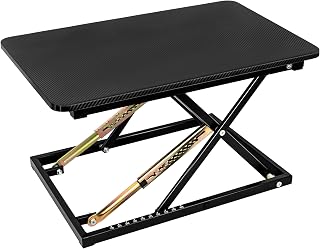
The Jarvis is a manual converter with a bamboo top and steel frame. No power cord, no motor noise, no assembly. You raise and lower it with a hand crank, which takes 10–15 seconds. The bamboo surface is warm and blends into residential décor better than black steel. It supports up to 35 lbs and is stable even on smaller desks. Per owner reports on r/standingdesk, it’s ideal for renters because it requires no installation and can move with you. The manual adjustment is a trade-off if you switch positions frequently, but it’s rock-solid and looks good.
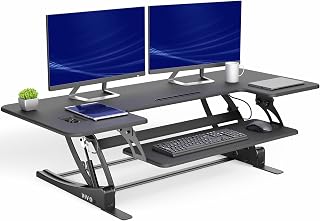
For users with desks 48 inches or wider who plan to stand for extended periods (3+ hours at a time), the Elite has a wide, braced base that distributes weight evenly and resists wobble. It’s 36 inches wide, so it needs a substantial desk, but the stability is noticeable. Electric motor, preset buttons, supports up to 50 lbs. Per teardown reviews, the internal mechanism is over-engineered—it’ll outlast most home offices.
VIVO Manual Standing Desk Riser
The VIVO is a pneumatic (gas-spring) riser that bridges manual and electric. You push a lever to adjust, and the gas spring holds it at any height without locking. It’s smooth, silent, and budget-friendly. Footprint is about 24 inches wide, weight capacity is 35 lbs, and the steel frame is industrial-grade. Per owner reviews on Amazon, it’s the best manual option for the price and doesn’t wobble. Ideal if you’re testing standing for the first time or don’t want to pay for a motor.
Measurement Checklist Before You Buy
Before ordering, take these measurements to avoid a mismatch:
- Desk width (side to side). Your converter should be at least 2 inches narrower than your desk to leave space for peripherals.
- Desk depth (front to back). Measure from the front edge to the back. Subtract 2 inches for clearance. That’s the maximum converter depth you can fit.
- Current desk height. Most office desks are 28–30 inches per ANSI/BIFMA standards. Add the converter’s maximum height to find your standing work height. Aim for elbows at 90 degrees when standing.
- Monitor size and weight. Add up the weight of everything going on the converter. Cross-reference the product’s weight rating.
- Available floor space below the desk. If the converter has a wide base, make sure your legs and chair don’t collide when it’s lowered.
Assembly and Installation
Most desktop converters require minimal assembly: bolting the top to the frame and plugging in the motor (if electric). No drilling, no wall brackets, no professional help needed.
Per manufacturer instructions: - Manual converters: 5–10 minutes, one person, no tools beyond a wrench. - Electric converters: 10–20 minutes, one person, a power drill helpful but not required.
Renters should confirm that assembly doesn’t require wall mounting or furniture modification. All the converters listed above are freestanding.
Ergonomic Setup in a Small Space
Once your converter is in place, set it up correctly to avoid strain:
- Sitting height: Elbows at 90 degrees, feet flat on floor, monitor at eye level.
- Standing height: Elbows still at 90 degrees, shoulders relaxed, monitor at or slightly below eye level.
- Transition schedule: Start with 20 minutes standing, 40 minutes sitting as a common starting point. Gradually increase standing time as your legs adapt. Most people max out at 50/50 or 60/40 standing/sitting.
- Anti-fatigue mat: In a small space, a thin mat (under 1 inch) under your feet reduces leg fatigue without eating floor space. Ensure it doesn’t create a tripping hazard.
For detailed setup guidance, see How to Set Up a Standing Desk Ergonomically.
Comparing Converters to Full Standing Desks
If your space allows, you might wonder whether a full standing desk is better than a converter. Trade-offs:
Standing desk converter: - Keeps your existing desk; saves space and money - Portable; you can move it or store it - Slower adjustment (especially manual models) - Limited height range (4–20 inches above your desk surface) - Works only if your current desk is sturdy
Full standing desk: - Dedicated lifting mechanism; often smoother and faster - Wider height range (often 22–48 inches from floor to work surface) - Larger footprint; occupies the same floor space as your old desk - Higher cost (mid-tier to premium-tier) - Better for long-term, all-day standing
In a small space, a converter is usually the right call. If you’re considering a full desk, Sit-Stand Desk Converter vs Full Standing Desk Cost breaks down the real costs.
FAQ
Q: Can I put a standing desk converter on a glass or laminate desk?
A: Yes, if the desk is sturdy and the converter has a wide, flat base. Glass desks can flex, which reduces stability; laminate is fine. Avoid placing a converter on a desk with a thin top or unsupported overhang. Test stability by pressing down firmly before loading your monitor.
Q: How long does an electric converter motor last?
A: Per manufacturer warranties and owner reports, most electric motors last 5–10 years with daily use. Helical-gear motors (quieter, more expensive) tend to outlast rack-and-pinion designs because they distribute load more evenly. Regular use actually extends motor life by keeping the mechanism lubricated.
Q: Is a standing desk converter worth it for occasional use?
A: If you stand 1–2 times per week, a manual converter is worth it. The cost is low, and you get the postural benefits without the complexity. If you stand daily, electric is worth the extra cost for speed and convenience.
Q: Can I stack two converters for extra height?
A: Technically yes, but it’s not recommended. Stacking reduces stability and can exceed the weight rating of the lower converter. If you need more height, choose a converter with a taller range or a full standing desk.
Q: Do I need a special mat under a standing desk converter?
A: No, but an anti-fatigue mat under your feet (not under the converter) reduces leg fatigue during long standing sessions. Keep the mat thin in a small space to avoid tripping.
Wrapping Up
A standing desk converter is the practical solution for small-space standing work. Measure your desk carefully, choose between manual and electric based on how often you switch, and prioritize stability and footprint over flashy features. The models above represent the best balance of durability, adjustability, and compact design for apartments and small offices in 2026.
Standing doesn’t have to mean sprawling. Start small, stay consistent, and your back will thank you.

