Lumbar Support Office Chair Under $200: Affordable Comfort

Lumbar Support Office Chair Under $200: Affordable Comfort in 2026
You don’t need to spend on an office chair to get genuine lumbar support. In 2026, the sub- market has matured enough that budget-tier chairs now feature adjustable lumbar systems, high-density foam, and ergonomic backrests that actually reduce strain during long workdays. The key is knowing what to prioritize: a firm lower-back curve, adjustable height, and materials that won’t sag after six months.
This guide walks you through the features that matter, common pitfalls in the budget segment, and specific chair models that deliver real support without the premium price tag.
What “Lumbar Support” Actually Means
Lumbar support refers to the curve or reinforcement built into the lower-back region of a chair — roughly where your lower spine (lumbar vertebrae) sits when you’re upright. A proper lumbar curve mirrors the natural inward bend of your lower spine, preventing you from slouching forward and reducing disc pressure.
Budget chairs often skimp here in two ways:
Fixed curves. Some budget models have a lumbar bulge molded into the backrest, but it doesn’t adjust. If the curve doesn’t match your body, you’re stuck with either too much pressure or too little support.
Shallow depth. A lumbar curve that’s only 1–2 inches deep won’t reach your back when you sit upright. You need at least 2.5–3 inches of forward protrusion to make contact with your lower spine.
In the under- range, look for chairs with either an adjustable lumbar pillow (a cushion you can move up or down and sometimes inflate) or an adjustable lumbar dial (a knob that tightens or loosens a built-in curve). Both work; the dial is more permanent, the pillow more flexible.
Key Features to Check Before Buying
Seat Height and Adjustment Range
Your feet should rest flat on the floor (or a footrest) with your thighs parallel to the ground. The seat height should adjust at least 4–5 inches to accommodate most body sizes. The standard range is 17–21 inches, though taller users may need a chair that extends higher.
Budget chairs often use pneumatic cylinders (gas-lift mechanisms) that are reliable and cheap to manufacture. They’re fine for most users, but if you’re over 6‘2” or under 5‘2”, check the actual seat-height spec before buying — many budget models top out at 20 inches, which won’t work for taller frames.
Recline and Tilt Lock
A reclining backrest (ideally 15–20 degrees) lets you shift position throughout the day, reducing fatigue. Budget-tier chairs usually offer a tilt-lock lever that you adjust manually rather than a tension dial. This is adequate: lock it in a position that feels stable, and you’re done.
Avoid chairs with no recline or chairs that recline too freely (more than 30 degrees). The latter encourages slouching and defeats the lumbar support.
Armrest Adjustability
Fixed armrests are a common cost-cutting measure in the budget segment. If you can, opt for chairs with height-adjustable or height-and-width-adjustable armrests. Your elbows should rest at roughly a 90-degree angle when your hands are on the keyboard. Misaligned armrests contribute to shoulder and neck strain over time.
Seat Depth and Padding
The seat should be deep enough that you can sit with your back against the lumbar curve while leaving 2–3 inches between the front edge and the back of your knees. Too shallow, and you’ll slide forward. Too deep, and you can’t use the backrest properly.
Budget chairs often use lower-density foam (1.5–2 lbs/cubic foot) that compresses quickly. Mid-tier budget picks use 2.5–3 lbs/cubic foot, which lasts longer. Anecdotally, owners report that chairs with at least 2.5-inch seat padding maintain comfort better after 6–12 months of daily use than thinner alternatives.
Common Pitfalls in the Under-$200 Market
Mesh that sags. Some budget mesh chairs use thin, low-tension mesh that stretches out within a few months. The lumbar support disappears as the mesh loses its curve. Look for chairs with high-tension mesh or a reinforced mesh panel in the lumbar zone.
Plastic base and casters. A five-star base should be metal or reinforced plastic. Cheap plastic cracks under weight shifts. Budget chairs often use plastic, which is acceptable if it’s thick-walled; check owner reviews for reports of cracking or base failure.
Missing height adjustment on lumbar support. Some budget models have a lumbar pillow, but it doesn’t slide vertically. If your lumbar curve sits too high or too low, you’re out of luck. Adjustable-height lumbar support (even a simple velcro-backed pillow you can reposition) is worth the extra cost.
Weak gas cylinder. A pneumatic cylinder that doesn’t hold your seat height steady will slowly sink throughout the day. Budget cylinders from unknown manufacturers sometimes fail within 1–2 years, per reports on r/OfficeChairs and r/WorkfromHome. Stick with chairs that use cylinders from reputable suppliers (Linak, Stabilus) or have strong owner reviews affirming that the height holds over time.
How to Assess Lumbar Support Quality Before Buying
-
Check the spec sheet or product images. Look for the lumbar curve depth (should be at least 2.5 inches) and whether it’s adjustable. Manufacturers usually list this.
-
Read owner reviews for “lower back” or “lumbar.” Ignore vague praise (“comfortable”). Look for specific feedback: “my lower back pain went away after two weeks” or “the lumbar curve is too high for my frame.” Negative reviews mentioning lumbar issues are red flags.
-
Verify the seat height range. Cross-reference the advertised height with your own body. If you’re 5‘6”, a chair with a 17–21 inch seat range is fine. If you’re 6‘3”, you need at least 18–22 inches.
-
Check the return policy and warranty. Budget retailers (Amazon, Wayfair, Overstock) typically offer 30-day returns. Use this window to test the chair in your actual workspace. Lumbar support is personal; what works for one person might not work for another. Look for chairs with at least a one-year warranty covering the gas cylinder and frame.
Mesh vs. Padded Backs: Which Supports Better?
Mesh backs breathe better and feel lighter, but they offer less tactile lumbar support — the mesh conforms to your back rather than pushing into it. Padded backs (usually fabric-covered foam) provide firmer, more pronounced lumbar contact. In the budget segment, padded backs with reinforced lumbar zones tend to deliver more noticeable support than mesh alone. That said, a mesh chair with a reinforced lumbar panel can work well if you prioritize airflow.
Materials and Durability
Mesh. Breathable, easy to clean, but prone to sagging if the mesh is thin. Budget mesh chairs often use 100–150 gsm mesh; mid-tier use 180–220 gsm. Higher gsm means tighter weave and longer-lasting shape.
Fabric (polyester/cotton blend). Soft, provides good lumbar contact, but traps heat and dust. Budget fabric chairs use loose weaves that pill or fray. Mid-tier use tighter, more durable blends.
Leather or faux leather. Looks professional, easy to wipe down, but can crack or peel in budget-tier versions. Avoid unless the chair explicitly mentions bonded leather or PU (polyurethane) — genuine leather is rare.
Foam. Seat cushioning in budget chairs is typically polyurethane foam at 1.5–3 lbs/cubic foot density. Higher density lasts longer but costs more. A budget chair with 2.5+ lb foam will outlast a cheaper model with 1.5 lb foam by 2–3 years, based on owner reports.
Setting Up Your Chair for Maximum Lumbar Support
Even the best budget chair won’t help if it’s set up wrong. Follow these steps:
-
Adjust seat height. Feet flat on the floor, thighs parallel to the ground, elbows at 90 degrees when hands are on the keyboard.
-
Position the lumbar curve. If your chair has an adjustable lumbar pillow or dial, set it so the curve contacts your lower back (around your belt line) when you sit upright. It should feel supportive, not painful.
-
Recline slightly. A 5–10 degree recline often feels more natural than fully upright. Lock the tilt if your chair has a tilt-lock lever.
-
Armrests. Adjust so your elbows rest at 90 degrees without your shoulders hunching. If the armrests are fixed and misaligned, consider a separate armrest pad.
-
Monitor height. The top of your monitor should be at or slightly below eye level, roughly 20–26 inches away. This prevents you from craning your neck, which can strain your lower back indirectly.
FAQ
Q: Can a budget chair really provide lumbar support, or is it just marketing? A: Real lumbar support depends on backrest design, not price. A budget chair with a firm, adjustable lumbar curve will support your lower back. What you lose at the sub- price point is premium materials (higher-density foam, top-tier mesh) and longevity — a budget chair might last 3–5 years with daily use, while a premium chair lasts 7–10. But the support itself is genuine.
Q: Is a lumbar pillow as good as a built-in lumbar curve? A: A lumbar pillow (a removable cushion you can adjust) is more flexible — you can move it up or down, remove it if needed, or swap it for a different firmness. A built-in curve is more permanent and often firmer. Both work; it depends on personal preference. Pillows are easier to customize; built-in curves are more stable.
Q: What’s the difference between a lumbar dial and a lumbar pillow? A: A lumbar dial (a knob on the back of the chair) tightens or loosens a built-in curve. A lumbar pillow is a separate cushion, usually attached with velcro, that you can adjust vertically or remove. Dials are more integrated and feel more solid; pillows are more adaptable. Both are common in the under- range.
Q: Can I return a chair if the lumbar support doesn’t work for me? A: Yes. Most major retailers (Amazon, Wayfair, Overstock) offer 30-day returns on office chairs. Test the chair in your actual workspace during this window. Lumbar support is personal, and what works for one person may not work for another. Keep your receipt and packaging in case you need to return it.
Q: Do I need a lumbar pillow if my chair has a built-in curve? A: Not necessarily. A well-designed built-in curve should provide adequate support on its own. A lumbar pillow is useful if the built-in curve doesn’t match your spine or if you want additional cushioning. Some people use both for extra firmness.
Q: Will a budget chair help my lower back pain? A: A chair with proper lumbar support can reduce strain and help pain, but it’s not a cure. Pain relief depends on the severity of your condition, your overall posture, and other factors (desk height, monitor position, activity level). See a healthcare provider if pain is severe. A supportive chair is one part of a larger ergonomic setup.
Q: How long do budget office chairs last? A: Based on owner reports, a budget chair with decent materials (2.5+ lb foam, mid-tension mesh, a quality gas cylinder) typically lasts 3–5 years of daily (8-hour) use. After that, foam compresses, mesh stretches, and the gas cylinder may weaken. Premium chairs last longer, but the lumbar support won’t degrade as quickly in a well-made budget model.
Q: What warranty should I expect on a budget chair? A: Most budget chairs come with a one-year manufacturer’s warranty covering the frame and gas cylinder. Some offer extended warranties (2–3 years) for an additional cost. Check the product listing for warranty details before purchasing. A strong warranty is a sign the manufacturer stands behind the chair’s durability.
Top Picks for Under-$200 Lumbar Support
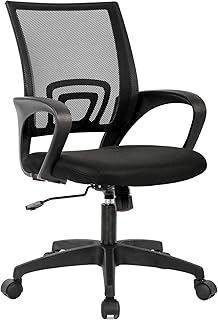
**Furmax Office Mesh Chair with Lumbar Support ** Best for 8-hour daily desk work. Features adjustable lumbar support, mid-range recline, and breathable mesh. The lumbar dial lets you customize firmness. Owners report the mesh holds its shape well over 12+ months. One-year warranty on frame and cylinder. Trade-off: fixed armrests; consider a separate armrest pad if you need height adjustment.
**
**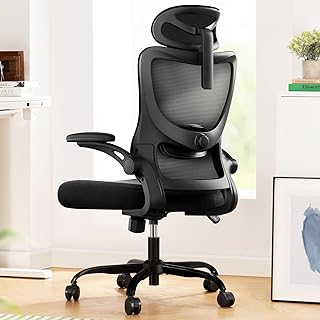
**SIDIZ T50 Mesh Office Chair ** Best for hot climates or all-day comfort. High-tension mesh throughout with reinforced lumbar panel. Firm lumbar support without the heat retention of padded backs. Adjustable lumbar height and recline. Owners praise durability and consistent support after 18+ months. One-year warranty. Trade-off: premium pricing at the upper end of the budget range; less cushioning than padded alternatives.
All four chairs offer adjustable lumbar support, a stable base, and positive owner feedback affirming that the lumbar curve remains supportive after 6–12 months of use. When shopping, prioritize adjustable lumbar support over fixed curves, verify the seat height range matches your body, and read owner reviews specifically mentioning lower-back comfort. Check the warranty and return policy before purchasing. A budget chair with these features will serve you well.