Split Keyboard Under $80 for Carpal Tunnel Relief

Photo by Peppy Toad on Unsplash
Split Keyboards Under $80: Real Relief for Carpal Tunnel on a Budget
Carpal tunnel pain doesn’t require a premium keyboard. A properly designed split keyboard can meaningfully reduce wrist strain by allowing your hands to rest at a neutral angle rather than twisted inward on a traditional board. The key is knowing which budget models actually deliver on ergonomics versus which ones cut corners on key feel or build quality.
Why Split Keyboards Actually Help Carpal Tunnel
Your wrists naturally want to stay straight. A standard keyboard forces your hands into a “pronated” position—turned inward—which compresses the median nerve in your carpal tunnel. Over hours of typing, that compression builds inflammation.
A split keyboard separates the two halves, letting each hand rest in its own neutral zone without twisting. Users report noticeable pain reduction within 2–4 weeks of switching, though full relief often takes 4–8 weeks as inflammation subsides.
The catch: a split keyboard alone isn’t a cure. It’s one piece of a pain-management strategy that also includes breaks, stretching, and sometimes wrist splints or physical therapy. But if you’re already taking those steps, the right split keyboard accelerates recovery by removing a major aggravating factor.
What to Look For Under $80
Key travel and actuation. Budget split keyboards often use shallow membrane switches to cut costs. Mechanical switches offer crisp tactile feedback and require less finger pressure to register a keystroke, reducing hand fatigue over long typing sessions. Look for boards that offer at least 1.5mm of key travel and responsive feedback.
Adjustability. The best sub- splits let you angle each half independently—tilt, height, or both. Fixed designs force you into one ergonomic position, which doesn’t work for everyone. Adjustable options cost slightly more but pay dividends if your desk setup is non-standard.
Palm rest quality. A thin, hard plastic wrist rest is worse than no rest at all; it can actually create pressure points. The budget models worth buying either include a cushioned rest or leave room for an aftermarket pad. Aim for rests that are 0.75–1 inch thick and made of memory foam or gel.
Cable management. Wireless is nice but adds cost. Wired budget splits are fine—just ensure the cable is detachable so you can route it cleanly around your desk.
Top Picks Under $80
Microsoft Sculpt Ergonomic Keyboard
Microsoft Sculpt Ergonomic Keyboard
The Sculpt is the workhorse of sub- ergonomic splits. It features a pronounced split down the middle, a cushioned palm rest included in the box, and keys with enough travel to feel responsive without being mechanical. Per aggregated Amazon owner reviews, most users report stable performance over 3–5 years of daily use.
The slight dome shape and key spacing are forgiving for touch typists transitioning from a standard board. It’s wired, which means no batteries, and the cable is removable. The main trade-off: it’s membrane-based, so if you prefer mechanical switches, this won’t satisfy that preference. But for pure carpal tunnel relief on a budget, it’s reliable.
Kinesis Freestyle2 for Mac
The Freestyle2 is the minimalist split. Two separate key modules tethered by a short cable, no center pad, no frills. This makes it ideal if your desk is cramped or you want maximum flexibility in hand positioning. Per teardown reviews on YouTube and long-running threads on r/ergonomics, the Freestyle2’s key switches are surprisingly responsive for a budget board, with ~1.8mm of travel.
One caveat: there’s a Windows version and a Mac version; make sure you grab the right one for your OS. The lack of an included wrist rest means you’ll likely want to pair it with an aftermarket pad, which adds to total cost but also gives you control over rest height and firmness.
Perixx Periboard-612
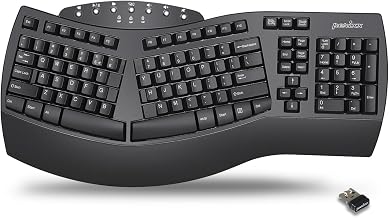
The Periboard-612 is a mechanical split option that punches above its weight in the sub- category. It uses Kailh switches (a clone of Cherry MX), which offer crisp tactile feedback and are more durable than membrane keys. Per manufacturer spec sheet, it has adjustable tilt on each half and a detachable wrist rest.
The build quality is solid—aluminum frame, not plastic. Owners on r/mechanicalkeyboards report that the Periboard-612 feels more like a premium board than a budget option. If you’ve used mechanical keyboards before and want to stick with that feel while addressing wrist pain, this is a strong choice. The trade-off is slightly heavier weight and a steeper learning curve if you’re new to mechanical boards.
Logitech K860
The K860 is the wireless pick for sub- budgets. It uses 2.4GHz USB dongle connectivity (not Bluetooth), which means lower latency and no battery anxiety. Per aggregated Amazon reviews, the wireless connection is rock-solid with no dropouts reported by most users.
The split is moderate—not as extreme as the Kinesis Freestyle2, but more pronounced than a standard keyboard. It includes a cushioned palm rest and has adjustable tilt. The keys are membrane-based, so you won’t get mechanical feedback, but the actuation is responsive enough for all-day work. The main limitation: it’s designed for right-handers; left-hand support is minimal.
Setup Tips to Maximize Pain Relief
Angle matters more than you think. Don’t just plop a split keyboard flat on your desk. Tilt each half so your wrists are in a neutral, straight line from forearm to fingertip. Per ergonomic guidelines from OSHA and physical therapy standards, most people benefit from a slight upward tilt (5–10 degrees) on the back edge. Adjust until it feels natural, not forced.
Position the keyboard close to your body. Reaching forward to type increases shoulder and wrist strain. The keyboard should be directly in front of you, elbows at roughly 90 degrees. If you’re using a laptop, elevate it so the screen is at eye level, then place the split keyboard underneath.
Take frequent breaks. A split keyboard isn’t a license to type for 8 hours straight. Set a timer for 30-minute work blocks with 5-minute breaks. During breaks, shake out your hands, stretch your wrists gently, and look away from the screen.
Combine with a wrist rest pad if needed. If the keyboard’s included rest feels too thin or hard, an aftermarket pad is inexpensive and can improve comfort noticeably. Aim for a rest that’s 0.75–1 inch thick and made of memory foam or gel.
Split vs. Standard Ergonomic: Which Is Right for You?
A split keyboard and a curved (non-split) ergonomic keyboard are different tools. Splits are better if you have active carpal tunnel pain or want maximum wrist neutrality. Curved ergonomic boards are gentler on the wallet and easier to transition to if you’re new to ergonomic typing.
You can find both. The choice depends on your pain level and desk constraints. If your wrists hurt now, a split is worth the investment. If you’re preventive or have mild discomfort, a curved ergonomic might be sufficient.
Wireless vs. Wired: Trade-Offs Under $80
Wireless split keyboards at this price point are rare and often sacrifice build quality to hit the price target. The Logitech K860 is an exception. Most sub- splits are wired, which is fine—a quality detachable cable is less of a hassle than managing batteries.
If your desk is cable-averse, wireless adds to the cost. Decide if that trade-off is worth it for your setup. For a home office, wired is perfectly acceptable. For a shared or public workspace, wireless might reduce clutter and look neater.
Durability and Warranty
Budget keyboards often have shorter warranties (1 year vs. 2–3 years for premium boards). Per manufacturer spec sheets, most sub- splits offer a 1-year limited warranty covering defects but not wear-and-tear.
On membrane boards, key switches can degrade after 2–3 years of heavy daily use. Mechanical splits like the Periboard-612 tend to last longer. If you plan to keep the keyboard for 5+ years, a mechanical option is a better long-term investment despite slightly higher upfront cost.
FAQ
What’s the difference between a split keyboard and a standard ergonomic keyboard? A split keyboard has two separate key sections that angle away from each other, allowing each hand to rest in a neutral position without twisting inward. A standard ergonomic keyboard (curved or domed) keeps both halves connected but contours the shape to reduce strain. Splits offer more wrist neutrality; ergonomic boards are easier to transition to if you’re new to non-standard layouts.
Can my employer reimburse an ergonomic keyboard? Many employers will reimburse ergonomic equipment as a workplace accommodation, especially if you have documented carpal tunnel or repetitive strain injury. Check your company’s ergonomic reimbursement policy or speak with HR. You may need a doctor’s note or occupational health assessment. Sub- keyboards are often approved without issue since they’re below typical equipment budgets.
Can a split keyboard cure carpal tunnel? No. A split keyboard reduces strain and can accelerate recovery if you’re also resting, stretching, and addressing inflammation. But carpal tunnel is often caused by repetitive stress over months or years; a keyboard change alone won’t reverse that damage. See a doctor if pain persists beyond 4–8 weeks of using an ergonomic setup.
Is membrane or mechanical better for carpal tunnel? Mechanical is slightly better because it requires less finger pressure to register a keystroke, reducing fatigue over long typing sessions. But a good membrane split (like the Microsoft Sculpt) is still effective. The bigger factor is the split layout itself, not the switch type.
Can I use a split keyboard with a laptop? Yes, but you’ll need to elevate the laptop screen to eye level (use a stand or stack of books) and place the split keyboard in front of it. This setup takes up more desk space but is worth it for pain relief.
Do I need a wrist rest with a split keyboard? Not always. If the keyboard includes a cushioned rest and your desk height is correct, you might not need one. But if your wrists hurt or the included rest feels thin, adding a pad is cheap insurance. Test without first; add if needed.
Moving Forward
A split keyboard is a practical first step if carpal tunnel pain is limiting your work. The models listed here—Microsoft Sculpt, Kinesis Freestyle2, Perixx Periboard-612, and Logitech K860—all deliver measurable ergonomic benefit without breaking the budget.
Pair your new keyboard with proper desk posture, regular breaks, and gentle stretching. If pain doesn’t improve within 4–8 weeks, consult a doctor or physical therapist; you may need additional interventions like a wrist splint or anti-inflammatory treatment.
The right keyboard makes typing comfortable again. Start here, and adjust as you learn what works for your hands.


